Every morning, across thousands of corporate networks, the same invisible transaction plays out. An employee unlocks their machine, opens an internal application, and is immediately recognised — no login prompt, no password field, no second factor. From the user’s perspective, access is simply there.
Behind that seamless experience sits a carefully layered architecture involving Active Directory, a Kerberos ticket exchange, an identity broker, a cryptographically signed token, and access control logic embedded in the application itself. Each layer has a distinct responsibility. Each hands off cleanly to the next. And when any layer is missing or misconfigured, the whole experience breaks in ways that are difficult to diagnose without understanding how the pieces fit together.
This article examines that architecture end to end — from the Windows login event to the moment a Spring Boot service decides whether to grant or deny an API call. The goal is not a configuration guide. It is a clear picture of what enterprise SSO actually does, why it is designed the way it is, and where the real complexity lives.
Token storage and security — what happens to the token once the application has it — is a substantial topic in its own right and is covered in the next article in this series.
1. The architecture — five layers, five responsibilities
Enterprise authentication is not a single system. It is a stack of specialised layers, each solving one part of a problem that spans identity governance, network security, protocol standards, and application development. Understanding where each layer ends and the next begins is the foundation for everything that follows.
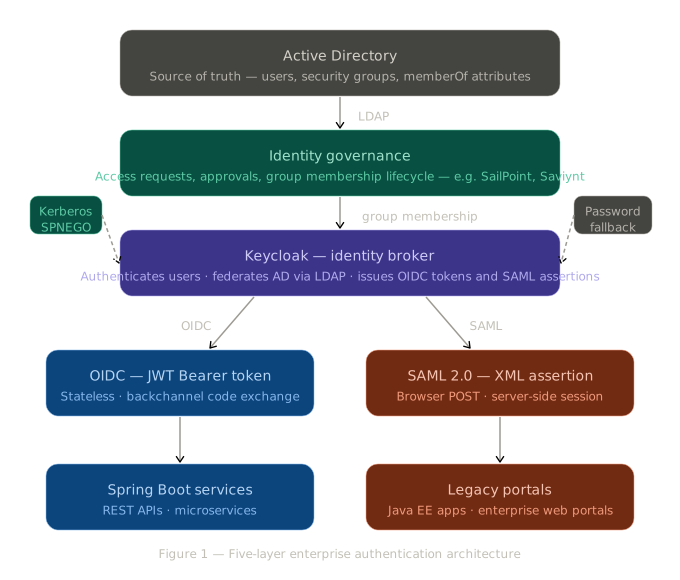
Active Directory holds the authoritative record of every user account and every security group in the organisation. Nothing downstream is more trusted.
Identity governance is the layer that determines who belongs to which group — and therefore who can access what. Platforms such as SailPoint, Saviynt, or Microsoft Entra ID Governance manage the access request and approval workflows: a new joiner requests access, a manager approves it, the system updates AD group membership accordingly. This layer rarely appears in developer discussions, yet it is what makes the rest of the architecture meaningful. By the time a user authenticates, their access rights have already been determined through an audited, governed process.
Keycloak is the identity broker. It connects to AD via LDAP, handles authentication, and translates the result into tokens and assertions that applications can consume. Critically, applications never speak to AD directly — all identity transactions flow through Keycloak, which provides a single point of control, audit, and configuration.
OIDC and SAML are the protocols that carry identity information from Keycloak to applications. The choice between them is driven by the nature of the application, not by anything Keycloak does differently at the authentication stage.
2. The silent login — how Kerberos and SPNEGO work
The absence of a password prompt is not a convenience feature bolted onto the authentication system. It is the intended behaviour of Kerberos — a cryptographic authentication protocol designed by MIT in the 1980s and built into every version of Windows since 2000. Understanding how it works explains both why enterprise SSO feels seamless and why it only works in specific contexts.
The ticket exchange
Kerberos operates on the principle that trust can be delegated through tickets issued by a central authority — the Key Distribution Center (KDC), which runs on every Active Directory domain controller. When a user logs into Windows, two things happen before they open a single application:
- The OS performs an Authentication Service (AS) exchange with the KDC, presenting the user’s credentials.
- The KDC issues a Ticket Granting Ticket (TGT) — a time-limited, cryptographically sealed proof of identity — which the OS stores in the credential cache for the duration of the session.
When the user later navigates to a Keycloak-protected application, the SPNEGO protocol orchestrates the following exchange:
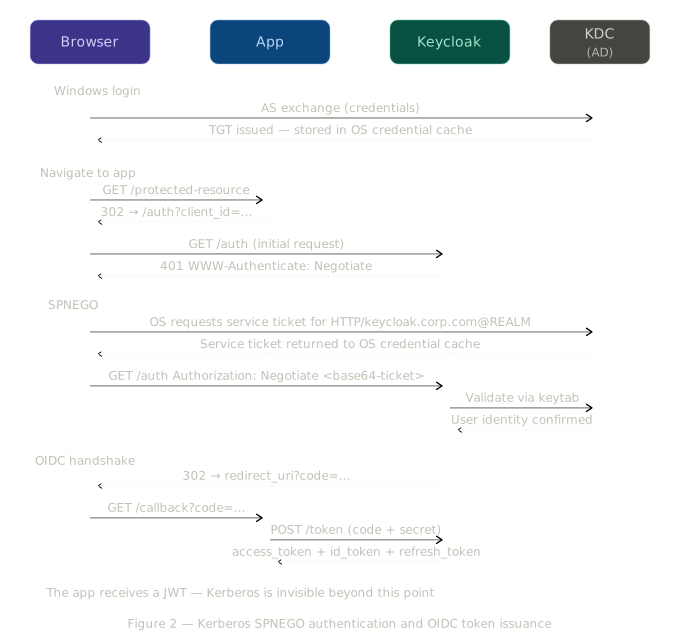
Keycloak signals its support for SPNEGO by responding to the initial authentication request with HTTP 401 and the header WWW-Authenticate: Negotiate. The browser recognises this signal and instructs the OS to obtain a Kerberos service ticket for Keycloak’s registered service principal — a unique identifier of the form HTTP/keycloak.corp.com@CORP.COM. The OS uses the cached TGT to request this ticket from the KDC without any user interaction.
The service ticket is returned to Keycloak in the Authorization: Negotiate <base64-token> header. Keycloak validates it using a keytab file — a pre-shared cryptographic key that Keycloak holds for its service principal. Validation succeeds, the user’s identity is established, and Keycloak proceeds to issue a token. The application downstream observes none of this — it receives a signed JWT and operates on that alone.
Why this only works in the browser
The
Negotiatetoken is generated by the Windows operating system, not by the browser. A developer attempting to reproduce this flow in Postman or any other HTTP client will find that SPNEGO never triggers — because those tools have no access to the TGT sitting in the OS credential cache and cannot request a service ticket from the KDC on the user’s behalf. Keycloak falls back to presenting its standard login page. This is expected behaviour, not misconfiguration, and it reflects the fundamental design of Kerberos: the OS is the trusted party, and only the OS can participate in the ticket exchange.
When Kerberos is not available — the password fallback
Not every user operates on a domain-joined machine, and not every deployment has Kerberos configured. When SPNEGO is unavailable — a remote contractor, a developer’s local environment, or a non-Windows workstation — Keycloak falls back to its standard username and password login form. For programmatic access, the Resource Owner Password Credentials grant offers a direct path to token issuance:
POST /realms/{realm}/protocol/openid-connect/token
Content-Type: application/x-www-form-urlencoded

grant_type=password
&client_id=my-app
&client_secret=secret
&username=john
&password=pass
The token produced by this path is structurally identical to one obtained via Kerberos — the same claims, the same roles, the same downstream enforcement. The authentication mechanism is an implementation detail that no part of the application stack needs to be aware of. This separation is deliberate and valuable: it means the application’s authorisation logic is insulated from changes in how users authenticate.
3. SAML and OIDC — two protocols for two eras
Once Keycloak has established the user’s identity, it must communicate that identity to the application. Two protocols exist for this purpose, and understanding the difference between them illuminates much of the complexity that developers encounter when integrating with enterprise identity systems.
SAML 2.0 — designed for the browser era
SAML 2.0, standardised in 2005, was built for an internet of server-rendered web applications. It works by having Keycloak issue a signed XML document — the SAML assertion — which is delivered directly to the application via a browser POST. The assertion contains the user’s identity, attributes, and group memberships inside an <AttributeStatement> block, and the application creates a server-side session upon receiving it.
<saml:AttributeStatement>
  <saml:Attribute Name="Role">
    <saml:AttributeValue>gApp_HRPortal_Admin</saml:AttributeValue>
    <saml:AttributeValue>gApp_HRPortal_Viewer</saml:AttributeValue>
  </saml:Attribute>
</saml:AttributeStatement>
SAML remains the integration standard for legacy enterprise portals, older Java EE applications, and many commercial SaaS platforms that predate the OIDC era. Its verbosity and browser-dependency make it a poor fit for modern API-driven architectures — but it is very much alive in production environments, and understanding its role prevents confusion when a Keycloak deployment must serve both legacy and modern consumers from the same realm.
OIDC — designed for the API era
OpenID Connect, finalised in 2014 as a layer on top of OAuth 2.0, addressed the limitations of SAML for a world of REST APIs, single-page applications, and microservices. It replaces XML with compact JSON Web Tokens, browser POSTs with server-to-server backchannel exchanges, and server-side sessions with stateless Bearer tokens.
For Spring Boot services — and for the rest of this article — OIDC is the relevant path.
| SAML 2.0 | OIDC | |
|---|---|---|
| Token format | Signed XML assertion | Signed JWT (JSON) |
| Transport | Browser POST to ACS URL | Backchannel server-to-server |
| Session model | Server-side session cookie | Stateless Bearer token |
| Role location | <AttributeStatement> in XML | realm_access.roles in JWT |
| Best fit | Legacy portals, Java EE apps | Spring Boot APIs, SPAs, microservices |
A significant architectural property of both protocols deserves emphasis: the upstream authentication mechanism — Kerberos, password form, or any other — is invisible to the application. An app consuming OIDC tokens from Keycloak has no way to distinguish between a user who authenticated silently via Kerberos and one who typed their password. This separation is one of the core design virtues of an identity broker.
4. The OIDC handshake — what actually happens over the wire
Conceptual familiarity with OIDC is common. Familiarity with the actual HTTP exchange is less so — and the gap between the two is where debugging becomes difficult. The following is the concrete sequence of requests and responses that produces a token.
The authorisation request
When an unauthenticated user reaches a protected route, the application redirects the browser to Keycloak’s authorisation endpoint:
GET /realms/{realm}/protocol/openid-connect/auth
  ?client_id=my-app
  &response_type=code
  &redirect_uri=https://my-app.corp.com/callback
  &scope=openid profile email
  &state=a8f3bc12
response_type=code instructs Keycloak to issue an authorisation code rather than a token — a distinction whose significance becomes clear shortly. The state parameter is a random value generated by the application to prevent cross-site request forgery; Keycloak will echo it unchanged in its response.
Authentication and redirect
Keycloak responds with 302, directing the browser to either a login page or — if SPNEGO is available — completing authentication silently. Once the user is authenticated, Keycloak issues another 302 back to the application’s registered redirect_uri:
302 Location: https://my-app.corp.com/callback
  ?code=eyJhbGciOiJSUzI1NiJ9...
  &state=a8f3bc12
The code is short-lived, typically expiring within sixty seconds, and is valid for a single use.
The token exchange
The application’s back-end immediately exchanges the code for tokens in a direct server-to-server call to Keycloak — a call the browser never makes and never sees:
POST /realms/{realm}/protocol/openid-connect/token
Content-Type: application/x-www-form-urlencoded

grant_type=authorization_code
&code=eyJhbGciOiJSUzI1NiJ9...
&redirect_uri=https://my-app.corp.com/callback
&client_id=my-app
&client_secret=s3cr3t
Keycloak responds with the token set:
{
  "access_token": "eyJhbGciOiJSUzI1NiIsInR5cCI6IkpXVCJ9...",
  "id_token": "eyJhbGciOiJSUzI1NiIsInR5cCI6IkpXVCJ9...",
  "refresh_token": "eyJhbGciOiJIUzI1NiIsInR5cCI6IkpXVCJ9...",
  "expires_in": 300,
  "token_type": "Bearer"
}
The security rationale for the two-step exchange
Returning the token directly in the redirect URL — the simpler approach — would expose it in browser history, server access logs, and the
Refererheader of any subsequent request. A token appearing in a URL is a token at perpetual risk of exposure.The authorisation code solves this by separating proof of authentication from the credential itself. The code is useless without the
client_secret, which never leaves the application server. The actual tokens are exchanged in an HTTPS request body, server-to-server, and are never present in any URL or browser-accessible location.This design assumption — that there is a trusted server-side component capable of holding a
client_secret— does not hold for single-page applications or native mobile apps. The Backend for Frontend (BFF) pattern addresses this by introducing a thin server layer whose sole responsibility is to perform the code exchange, hold the tokens, and expose a session cookie to the browser. The browser never receives a raw token. The security implications of token storage, and the BFF pattern in depth, are the subject of the next article.
5. Inside the JWT — where roles come from and what they mean
A JSON Web Token is a compact, self-contained credential. It carries identity claims, role information, and a cryptographic signature — everything a receiving service needs to make an access decision without consulting Keycloak for each request. But before examining what is inside the token, it is important to understand how the information in it arrived there.
The role begins as an access request
In Active Directory, a user’s group memberships are recorded in the memberOf attribute. A user holds gApp_ABC_Admin in their memberOf only because someone — a manager, a system owner, or an automated workflow — explicitly approved that membership and an administrator granted it.
This is the identity governance layer, made concrete. The token a user receives at login is not a reflection of who they are claiming to be. It is a reflection of what access has been formally granted to them, through an auditable process, before they ever opened their browser. The seamlessness of the user experience should not obscure the governance rigour that underpins it.
Keycloak reads these memberships via LDAP federation during authentication and includes the group information in the token it issues.
Best practice — Keycloak-managed role mapping
The recommended architecture is for Keycloak to translate AD group names into application-agnostic role names using a protocol mapper. The access token then carries clean, stable role identifiers under the realm_access.roles claim:
{
  "sub": "f1b2c3d4-5678-90ab-cdef-1234567890ab",
  "iss": "https://keycloak.corp.com/realms/internal",
  "exp": 1714336700,
  "iat": 1714336400,
  "azp": "my-app",
  "scope": "openid email profile",
  "realm_access": {
    "roles": ["Admin", "Viewer", "offline_access"]
  },
  "resource_access": {
    "my-app": {
      "roles": ["report-viewer"]
    }
  },
  "preferred_username": "john.smith",
  "email": "john.smith@corp.com"
}
This approach decouples applications from the directory. An AD group can be renamed, restructured, or replaced without any change to application code — only the mapper in Keycloak requires updating. For organisations operating many downstream applications, this centralisation of role translation is a meaningful reduction in operational risk.
Real-world variation — raw AD group pass-through
A common alternative in large enterprises is to configure Keycloak as a pass-through: AD group names are forwarded directly into the token without translation. The token carries a groups claim containing the raw group names:
{
  "sub": "f1b2c3d4-5678-90ab-cdef-1234567890ab",
  "iss": "https://keycloak.corp.com/realms/internal",
  "groups": [
    "gApp_ABC_Admin",
    "gApp_XYZ_Viewer",
    "gApp_ABC_User"
  ]
}
The naming convention encodes the permission structure: g identifies the entry as a group, the middle segment identifies the application, and the suffix denotes the role. Each application is responsible for parsing this convention and deriving its own permission model.
This approach is pragmatic when the IAM team manages AD independently of Keycloak administration and maintaining a separate role taxonomy in Keycloak is not feasible. The architectural tradeoff is that coupling between the AD naming convention and application code becomes implicit — a convention change in the directory propagates as a breaking change to every application that parses it.
The three tokens and their distinct purposes
The token exchange response delivers three distinct credentials, each with a specific function:
- The ID token establishes identity — it carries claims such as
preferred_username,email, andname. It is intended for the client application to render user-facing information and should never be forwarded to a back-end API. - The access token establishes authorisation — it carries the role claims and is the credential presented to every API call as a Bearer token. Its short expiry (typically five minutes) limits the window of exposure if a token is compromised.
- The refresh token enables session continuity — it allows the application to obtain a new access token when the current one expires, without requiring the user to re-authenticate. Its security properties, storage requirements, and rotation strategy are addressed in the next article.
The access token does more than carry roles
Roles are one part of what the access token carries. More broadly, it is the authorisation credential for every interaction the authenticated user makes after login. It propagates identity across microservices so each service knows who the original user is without re-authenticating. It enforces scoped API access via the
scopeclaim — a token scoped toread:reportscannot call a write endpoint regardless of the user’s role. It enables audit traceability through thesub(user ID) andazp(client application) claims, attributing every action to a specific user and client without session state. Teams often add custom claims — tenant ID, data classification level, cost centre — that travel with every request for any service to use. Every service that validates the token can make access decisions independently, without contacting Keycloak again. That is the full weight of what needs to be protected.
6. Enforcing access in Spring Security
The access token arrives at the Spring Boot service as a Bearer token in the Authorization header of every API request:
GET /api/reports
Authorization: Bearer eyJhbGciOiJSUzI1NiIsInR5cCI6IkpXVCJ9...
Spring Security validates the token’s cryptographic signature against Keycloak’s public key — fetched automatically at startup from the JWKS endpoint published in Keycloak’s discovery document — and then maps the token’s claims to GrantedAuthority objects for use in access decisions.
The standard approach — reading realm_access.roles
A JwtAuthenticationConverter bridges the gap between Keycloak’s token structure and Spring Security’s authority model:
@Bean
public JwtAuthenticationConverter jwtAuthenticationConverter() {
    JwtGrantedAuthoritiesConverter converter = new JwtGrantedAuthoritiesConverter();
    converter.setAuthoritiesClaimName("realm_access.roles");
    converter.setAuthorityPrefix("ROLE_");

    JwtAuthenticationConverter jwtConverter = new JwtAuthenticationConverter();
    jwtConverter.setJwtGrantedAuthoritiesConverter(converter);
    return jwtConverter;
}
This is wired into the security configuration alongside the resource server declaration:
@Bean
public SecurityFilterChain securityFilterChain(HttpSecurity http) throws Exception {
    http
        .authorizeHttpRequests(auth -> auth
            .requestMatchers("/public/**").permitAll()
            .anyRequest().authenticated()
        )
        .oauth2ResourceServer(oauth2 -> oauth2
            .jwt(jwt -> jwt
                .jwtAuthenticationConverter(jwtAuthenticationConverter())
            )
        );
    return http.build();
}
Method-level access control is then expressed declaratively:
@GetMapping("/admin/dashboard")
@PreAuthorize("hasRole('Admin')")
public ResponseEntity<String> adminDashboard() { ... }

@GetMapping("/reports")
@PreAuthorize("hasRole('Viewer')")
public ResponseEntity<List<Report>> getReports() { ... }
The alternative — parsing raw AD groups
Where Keycloak is configured to pass AD groups directly, a custom converter performs the translation that Keycloak would otherwise handle:
@Bean
public JwtAuthenticationConverter jwtAuthenticationConverter() {
    String appPrefix = "gApp_ABC_";

    JwtAuthenticationConverter converter = new JwtAuthenticationConverter();
    converter.setJwtGrantedAuthoritiesConverter(jwt -> {
        List<String> groups = jwt.getClaimAsStringList("groups");
        if (groups == null) return List.of();

        return groups.stream()
            .filter(g -> g.startsWith(appPrefix))
            .map(g -> g.substring(appPrefix.length()))   // "Admin", "Viewer"
            .map(role -> new SimpleGrantedAuthority("ROLE_" + role))
            .collect(Collectors.toList());
    });
    return converter;
}
The @PreAuthorize annotations — hasRole('Admin'), hasRole('Viewer') — are identical in both approaches. The converter absorbs the complexity of the naming convention so that no other part of the application needs to be aware of it.
A note on hasRole() and hasAuthority()
hasRole('Admin') is shorthand — Spring Security prepends ROLE_ internally and checks for the authority ROLE_Admin. hasAuthority('Admin') checks for the string Admin with no transformation. Both are valid, but the choice must be consistent with how the converter adds authorities. The pattern above uses hasRole() with ROLE_ added explicitly in the converter, which aligns with the Spring Security convention.
The full picture
When the employee in the opening scenario opened their internal application and found themselves already logged in, the following sequence had already played out — most of it in the time it takes a page to load.
Their access had been approved through a formal request process, their memberOf attribute in Active Directory reflecting that approval. Their Windows login had triggered a Kerberos AS exchange, placing a TGT in the OS credential cache. When their browser reached Keycloak, SPNEGO orchestrated a silent ticket exchange, and Keycloak validated their identity without a single credential being typed. The OIDC handshake ran — a short-lived authorisation code crossed the browser, and a JWT was issued in a server-to-server exchange the browser never saw. That JWT carried their roles, derived from AD group memberships read by Keycloak via LDAP. And when their first API call arrived at the Spring Boot service, the token’s signature was validated, the roles were extracted, and @PreAuthorize made the access decision.
Each layer did precisely one thing. None of them knew more than they needed to. The user knew nothing at all.
Getting the token to the application is only half the story. In the next article, we examine what happens once the token arrives: where it can safely be stored, how short expiry and refresh token rotation reduce exposure, what the Backend for Frontend pattern actually involves at the implementation level, and what happens when a token is compromised. The architecture that makes enterprise SSO seamless also creates specific, well-understood security obligations — and meeting them requires the same clarity of understanding applied here.