In the previous article, we followed an enterprise authentication flow from its origin — a Windows login event — through Kerberos, Keycloak, and an OIDC handshake, ending with a signed JWT landing in a Spring Boot service. The token that arrived carried more than just role claims. It is the authorisation credential for every interaction the authenticated user makes after login — propagating identity across microservices, enforcing scoped API access, enabling audit traceability through every service in the chain. Every service that validates it makes access decisions independently, without contacting Keycloak again.
That is a significant amount of trust placed in a single credential. And that trust is conditional. It holds as long as the token is handled correctly once it arrives. And “correctly” is not a vague aspiration — it has a precise meaning that varies by application type, threat model, and the sensitivity of what the token grants access to.
The principles in this article apply to any OAuth 2.0/2.1 authorisation server — Keycloak, Okta, Azure AD, Auth0, or a bank’s internal OAuth platform. The token structure, the threats, and the mitigations are standardised. Keycloak is the reference implementation throughout, but every pattern here applies universally.
This article addresses the second half of the story: where tokens live, how they are protected, how they expire and renew, and what happens when they need to be revoked. The same clarity of design that governs how tokens are issued governs how they must be managed.
1. Why token storage is a security decision, not an implementation detail
The access token issued by any OAuth 2.0/2.1 authorisation server is a bearer credential. The term is significant. It means that possession of the token is sufficient to exercise the access it represents — there is no second factor, no identity check, no binding to a specific device or session at the point of use. The service that receives the token validates its cryptographic signature and trusts the claims inside. It does not ask who is presenting it.
This is true regardless of which authorisation server issued the token. Keycloak, Okta, Azure AD — all produce the same bearer credential model. A token stored carelessly is access granted carelessly — to whoever finds it.
Every browser-based application must make an explicit choice about where the access token lives. The three main options are localStorage, sessionStorage, and an HttpOnly cookie, and they are not equivalent. Each has a distinct threat profile, a distinct relationship with the JavaScript execution environment, and a distinct set of mitigations required to use it safely. The choice is architectural, not incidental — and in regulated industries it carries audit implications.
The remainder of this article examines that choice, the threats it must account for, the patterns that resolve it, and the lifecycle properties — expiry, rotation, revocation — that govern the token from issuance to termination.
2. The threat landscape: how tokens get stolen
Before examining where tokens should live, it is worth being precise about the threats a storage decision must defend against. These are not theoretical — they are documented attack patterns with known mitigations.
Cross-site scripting (XSS) is the most prevalent vector for token theft in browser-based applications. An XSS attack injects malicious JavaScript into a page — through a vulnerable input field, a compromised third-party dependency, or an unsafe content rendering path. Once executing in the browser, that script has unrestricted access to localStorage and sessionStorage. A single line of JavaScript is sufficient to exfiltrate every token stored in either location. XSS vulnerabilities are consistently among the most commonly exploited in web applications, and the consequences of one in a system that stores tokens in localStorage are severe and immediate.
Token leakage via URL is the risk that motivated the two-step authorisation code exchange described in article one. If a token ever appears in a URL — as a query parameter, a fragment, or a path segment — it enters a chain of uncontrolled persistence: browser history, server access logs, proxy logs, and the Referer header sent to any resource loaded on the subsequent page. Tokens in URLs do not expire when the token expires. They persist in logs and history indefinitely. The code exchange was designed specifically to prevent this; any architecture that reintroduces tokens into URLs has undermined that design.
Man-in-the-middle attacks — an attacker intercepting traffic between the browser and the server — are mitigated by TLS. In practice, a correctly configured HTTPS deployment with HSTS eliminates this vector for browser-based communication. It remains relevant for mobile apps, API clients, and environments where TLS termination is misconfigured.
Refresh token theft is in some ways the higher-value target. The access token is short-lived — typically five minutes. The refresh token is long-lived — thirty minutes, hours, or longer depending on configuration. A stolen refresh token allows an attacker to silently renew access tokens indefinitely, without the user being notified, for as long as the refresh token remains valid and undetected. The implications are addressed in section 6.
These four threats form the basis against which every storage decision should be evaluated. The two-step code exchange in article one eliminated token exposure at the issuance stage. Storage and lifecycle management eliminate it at the consumption stage.
3. Where to store tokens: the options and their tradeoffs
This section focuses on browser-based applications — SPAs and server-rendered web apps. For mobile apps, the correct storage mechanism is the OS secure store: the iOS Keychain or Android Keystore, which are hardware-backed encrypted stores inaccessible to other apps. For server-side applications and the BFF pattern, the token never reaches the client at all — it is held in server-side session storage and covered in section 5.
localStorage is persistent browser storage that survives page refreshes, tab closes, and browser restarts. It is synchronously accessible from any JavaScript executing on the same origin. That accessibility is the problem. Any XSS attack that achieves code execution on the page can read the entire contents of localStorage in a single call. The token is not protected by any browser security boundary — it is simply a key-value store that JavaScript can read and write freely. localStorage should not be used to store access tokens or refresh tokens under any circumstances.
sessionStorage is scoped to the browser tab and cleared when the tab is closed. It does not survive navigation to a new tab or a browser restart. In terms of XSS exposure, however, it offers no meaningful improvement over localStorage — it is equally accessible to JavaScript executing on the page. The scope reduction reduces the persistence of a stolen token, but the theft itself is just as trivially achievable. sessionStorage is not a safe storage location for tokens.
HttpOnly cookies are the recommended storage mechanism for browser-based applications. An HttpOnly cookie is invisible to JavaScript — document.cookie does not include it, and no script executing in the browser can read or write its value. The browser sends it automatically on every matching request. A successful XSS attack cannot exfiltrate the token because the token is never accessible to JavaScript at all. The residual risk is CSRF — an attacker tricking the browser into making a request that automatically includes the cookie. This is well-understood and mitigated by the SameSite cookie attribute and CSRF tokens on state-changing endpoints.
In-memory storage — holding the access token in a JavaScript variable rather than any persistent store — is XSS-safe in the sense that the token is not accessible across page loads or from arbitrary scripts at a different point in the session. It is lost on page refresh, requiring a new token exchange or refresh token redemption on each page load. For high-security applications where the risk profile justifies the friction, in-memory storage combined with a HttpOnly refresh token cookie is a viable pattern — the refresh token is protected from JavaScript, and the access token is held only in memory for the duration of its use.
| XSS risk | CSRF risk | Persistence | Recommended | |
|---|---|---|---|---|
localStorage | High | None | Permanent | Never |
sessionStorage | High | None | Tab session | Never |
HttpOnly cookie | None | Medium (mitigatable) | Configurable | Yes — browser apps |
| In-memory | None | None | Page session | Yes — high-security SPAs |
| Mobile OS Keychain/Keystore | None | None | Persistent | Yes — mobile apps |
| BFF server-side session | None | None | Server-controlled | Yes — SPAs with BFF |
4. Why OAuth 2.0 alone is not enough — and what PKCE fixes
The gap in standard OAuth 2.0
The standard OAuth 2.0 authorisation code flow assumes a confidential client — a server-side application that can safely hold a client_secret. The security of the token exchange rests on that secret: only the legitimate application can present both the authorisation code and the matching client_secret at the /token endpoint. An intercepted code is useless without the secret.
Two situations break this assumption.
First, public clients — SPAs and mobile apps — have no safe place to store a client_secret. A secret embedded in a JavaScript bundle is readable by anyone who opens the browser developer tools. A secret compiled into a mobile app binary can be extracted with freely available tools in minutes. A client_secret in a public client is not a secret — it is a public value with a misleading name.
Second, even with a confidential client, the authorisation code is briefly exposed in the browser redirect URL. This opens a narrow but real attack surface — a malicious app registered on the same device can intercept the OS redirect broadcast, capture the code, and attempt to exchange it before the legitimate app does. In standard OAuth 2.0, there is nothing to verify that the party presenting the code at /token is the same party that initiated the authorisation request.
The authorisation code interception attack
On mobile platforms, multiple apps can register the same custom URI scheme as a redirect target. When the authorisation server redirects back with the code, the OS may present a choice — or silently route to the attacker’s app. The attacker now has the code. Without PKCE, and without a
client_secret(public client), the code can be exchanged directly for tokens. The legitimate app receives nothing. The attacker has full access.
What PKCE fixes
PKCE — Proof Key for Code Exchange (RFC 7636), pronounced “pixie” — solves this by replacing the static client_secret with a per-request, dynamically generated cryptographic proof that the initiator of the flow is the only party that can complete it.
Before initiating the authorisation request, the client generates a code_verifier — a cryptographically random string between 43 and 128 characters, held only in application memory. It then computes a code_challenge by taking the SHA-256 hash of the verifier and encoding the result as a URL-safe Base64 string. The challenge is sent with the initial /auth request. The authorisation server stores it alongside the issued code. When the client later presents the code at the /token endpoint, it must also present the original code_verifier. The server recomputes the hash and verifies it matches the stored challenge. If it does not — because an attacker intercepted the code — the exchange fails.
function generateCodeVerifier() {
  const array = new Uint8Array(64);
  crypto.getRandomValues(array);
  return btoa(String.fromCharCode(...array))
    .replace(/\+/g, '-').replace(/\//g, '_').replace(/=/g, '');
}

async function generateCodeChallenge(verifier) {
  const encoder = new TextEncoder();
  const data = encoder.encode(verifier);
  const digest = await crypto.subtle.digest('SHA-256', data);
  return btoa(String.fromCharCode(...new Uint8Array(digest)))
    .replace(/\+/g, '-').replace(/\//g, '_').replace(/=/g, '');
}
The security property is grounded in the one-way nature of the hash. The attacker sees the code_challenge in the initial request — it was transmitted openly. But the challenge alone cannot be reversed to produce the code_verifier. Only the party that generated the verifier and held it in memory can complete the exchange.
OAuth 2.1 mandates PKCE for all clients — including confidential server-side ones — as a defence-in-depth measure. Even if the client_secret is compromised, an intercepted code still cannot be redeemed without the code_verifier. Two independent mechanisms must both fail for the attack to succeed. The endpoint path varies by provider — /realms/{realm}/protocol/openid-connect/auth in Keycloak, /oauth2/authorize in Azure AD — but the PKCE parameters are identical across all compliant servers.
The code in the browser URL — is it a risk?
The authorisation code appears briefly in the browser URL before the back-end exchanges it. In practice the risk is low — it is single-use, expires in typically 60 seconds, requires
redirect_uribinding, and cannot be redeemed without theclient_secretor PKCE verifier. The more important caution is not to treat tokens-in-URLs as a safe general pattern. The access token carries none of these protections. A common developer mistake is passing it as a query parameter — having seen the authorisation code appear in a URL during the OAuth flow and assuming the pattern is acceptable. It is not.
5. Keeping tokens off the browser — the combined Spring Boot approach
PKCE addresses the code exchange for public clients. It does not address token storage. Once the SPA has exchanged the code for tokens, the same problem remains: where do those tokens live in the browser, and how are they protected?
The answer is to remove the responsibility from the browser entirely. The server performs the OIDC code exchange, holds the tokens in server-side session storage, and gives the browser only an HttpOnly session cookie as a reference. The browser holds the cookie. The tokens never leave the server.
This is the Backend for Frontend (BFF) concept — but it does not require a separate service. In practice, the same Spring Boot application that serves the SPA can own the session, perform the exchange, and proxy downstream API calls. No additional deployment layer. One codebase, one application.
The architecture
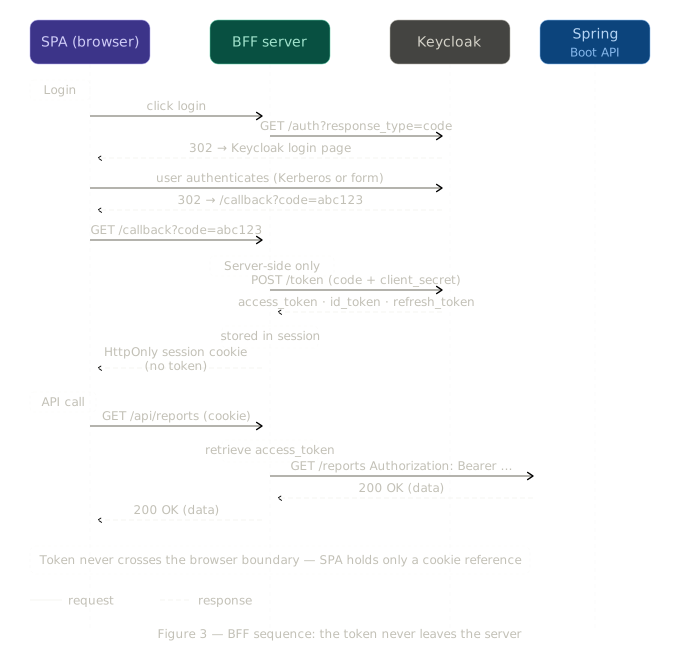
The SPA calls the Spring Boot app directly. The app owns the session, looks up the stored access token, attaches it to the outbound call to the downstream API, and returns the result. The browser sees data — never a token.
Spring Boot implementation
Spring Security’s oauth2Login() handles the full OIDC code exchange with Keycloak, stores the resulting OAuth2AuthorizedClient — which holds the access token, refresh token, and expiry — in the server-side session, and issues an HttpOnly session cookie to the browser automatically.
@Bean
public SecurityFilterChain securityFilterChain(HttpSecurity http) throws Exception {
    http
        .authorizeHttpRequests(auth -> auth
            .requestMatchers("/", "/login", "/error").permitAll()
            .anyRequest().authenticated()
        )
        .oauth2Login(oauth2 -> oauth2
            .defaultSuccessUrl("/")
        )
        .csrf(csrf -> csrf
            .csrfTokenRepository(CookieCsrfTokenRepository
                .withHttpOnlyFalse())
        );
    return http.build();
}
The controller that proxies to a downstream API retrieves the stored token from the OAuth2AuthorizedClient — no manual session lookup required. Spring Security also handles token refresh transparently when the access token expires:
@GetMapping("/api/reports")
public ResponseEntity<String> reports(
    @RegisteredOAuth2AuthorizedClient("keycloak")
    OAuth2AuthorizedClient authorizedClient) {

  return webClient.get()
      .uri("https://internal-reports-api.corp.com/reports")
      .header(HttpHeaders.AUTHORIZATION,
          "Bearer " + authorizedClient.getAccessToken().getTokenValue())
      .retrieve()
      .toEntity(String.class)
      .block();
}
The SPA calls /api/reports on the same Spring Boot app. The app holds the token in session, attaches it to the downstream call, and returns the result. The browser sees data — never a token.
The role of the session
The session is what makes this architecture work. When
oauth2Login()completes the OIDC code exchange, Spring stores two things in the server-side session: theSecurityContext— which holds the authenticated user’s identity and authorities, consulted on every request by@PreAuthorizeand the security filters — and theOAuth2AuthorizedClient— which holds the access token, refresh token, and expiry, resolved by@RegisteredOAuth2AuthorizedClient. The browser holds only a session ID cookie, an opaque random string that maps to this server-side state. The token never appears in it.Two production considerations follow from this. First, session timeout should align with the overall access policy — a session that outlives the token’s maximum renewable lifetime is a gap. Second, session storage matters in a scaled deployment. The default in-memory session store does not survive a server restart or scale across multiple instances. For production, Spring Session with Redis or a database backend distributes session state so any instance can serve any request. The security model is unchanged — the token is still server-side, the browser still holds only a cookie. The storage backend is an operational decision.
When would you want a separate BFF layer?
A dedicated BFF service only becomes necessary when the SPA and the backend are on completely separate domains with no shared session infrastructure, when multiple SPAs all need token management and a centralised component avoids duplicating the logic, or when the frontend and backend teams deploy independently. For a single team building an internal enterprise application — the scenario this article covers — the combined Spring Boot approach is simpler, easier to maintain, and architecturally sound. The security objective is identical: the token never crosses into browser territory.
6. Token expiry, refresh, and rotation
The access token issued by Keycloak carries an exp claim — an expiry timestamp, typically set to five minutes after issuance. This is not an arbitrary constraint. It is a deliberate security property: a token that expires quickly limits the window during which a stolen token can be used. An attacker who obtains a five-minute access token has, at most, five minutes of access before the token becomes invalid.
Short expiry, however, requires a mechanism for silent renewal — the user cannot be forced to re-authenticate every five minutes. The refresh token serves this purpose.
The refresh grant
When the access token expires, the application presents the refresh token to Keycloak’s /token endpoint using the refresh_token grant:
POST /realms/{realm}/protocol/openid-connect/token
Content-Type: application/x-www-form-urlencoded

grant_type=refresh_token
&refresh_token=eyJhbGciOiJIUzI1NiJ9...
&client_id=my-app
&client_secret=s3cr3t
Keycloak validates the refresh token and, if valid, issues a new access token — and, with rotation enabled, a new refresh token — without requiring the user to interact with a login page. From the user’s perspective, the session is continuous. From the security model’s perspective, the access credential is rotating on a five-minute cycle.
Refresh token rotation
Refresh token rotation is the practice of issuing a new refresh token on every use and immediately invalidating the previous one. Its security value is in replay attack detection. If a refresh token is stolen and the attacker uses it before the legitimate application does, Keycloak detects the double use on the next legitimate request and revokes the entire session.
What happens when a refresh token is stolen
With rotation enabled, the moment an attacker uses the stolen refresh token, the token they received becomes the current valid token. When the legitimate application subsequently attempts to renew its session using the original token, Keycloak detects that a superseded token is being presented — evidence of compromise — and revokes the session entirely. The legitimate user is forced to re-authenticate. The attacker’s newly obtained token is simultaneously invalidated. This is the intended outcome: a brief, visible disruption for the real user is a categorically better result than silent, persistent access for an attacker.
The recommended expiry configuration for most enterprise internal applications is:
| Token | Recommended expiry |
|---|---|
| Access token | 5 minutes |
| Refresh token | 30 minutes with rotation enabled |
| Session max | 8 hours |
These are starting points. Applications handling particularly sensitive data should use shorter windows. Applications where re-authentication friction is a significant concern — long-running internal tools, for example — may extend the session max while keeping the access token expiry short.
7. Token revocation: what happens when access should stop
Token expiry handles the passage of time. Revocation handles the deliberate termination of access — when a user leaves the organisation, loses a role, or is suspended pending investigation. These are operationally distinct scenarios with different urgency and different implementation costs.
The fundamental tension is not unique to Keycloak — it is a property of stateless bearer tokens under any OAuth 2.0 implementation. The resource server validates the token’s signature and trusts its claims without calling back to the authorisation server. That is what makes the architecture scalable. Revocation requires breaking that self-sufficiency — making the token untrustworthy before its expiry claim says it should be.
Three strategies exist, each resolving the tension differently. All are provider-agnostic in principle; Keycloak is shown as the concrete example.
Short expiry accepts the revocation window rather than eliminating it. If the access token expires in five minutes, a revoked user retains access for at most five minutes after the revocation event. For most enterprise contexts, this is an acceptable risk window. The operational cost is low — no additional infrastructure, no per-request network calls. The refresh token is invalidated immediately when the session is terminated, so the user cannot renew beyond the current access token’s lifetime.
Token introspection (RFC 7662) eliminates the window entirely. The application calls the authorisation server’s introspection endpoint on every incoming request, passing the access token and receiving a real-time validity determination. In Keycloak: /realms/{realm}/protocol/openid-connect/token/introspect. Equivalent endpoints exist in Okta, Azure AD, and Auth0. Revocation takes effect immediately — the next API call after the session is terminated returns a 401. The cost is statelessness: every request now requires a network round-trip, reintroducing the latency and availability dependency that JWT was designed to avoid.
Session termination (RFC 7009) offers immediate revocation without per-request overhead. An external system — an IAM tool, an offboarding workflow, a security incident response process — calls the authorisation server’s revocation endpoint or admin API to terminate the session. The access token remains technically valid until expiry, but the refresh token is invalidated, meaning the session cannot be extended. Combined with a short access token expiry, this provides near-immediate effective revocation with manageable operational complexity.
Identity governance closes the loop
This is where the governance layer introduced in article one becomes operationally critical at the end of the access lifecycle. When an employee leaves the organisation or is removed from an AD security group, the IAM governance tool — SailPoint, Saviynt, or equivalent — triggers the offboarding event. AD group membership is removed. The authorisation server session is terminated. The JWT the user currently holds becomes unrenewable at its next refresh attempt. The audit trail runs from the original access request approval all the way to the revocation event — a complete, governed lifecycle from grant to termination.
| Strategy | RFC | Revocation speed | Operational cost | Stateless? |
|---|---|---|---|---|
| Short expiry | — | Within expiry window | Low | Yes |
| Token introspection | RFC 7662 | Immediate | Medium — network call per request | No |
| Session termination | RFC 7009 | Near-immediate | High — requires orchestration | Yes |
The appropriate strategy depends on the sensitivity of what the token grants access to and the operational maturity of the organisation. For most internal enterprise applications, short expiry combined with session termination on offboarding is the correct balance. Token introspection is reserved for applications where even a five-minute window of post-revocation access is unacceptable.
The complete picture
The architecture described across these two articles is one in which every design decision is a response to a specific threat or operational requirement, and every layer does precisely one thing.
Access is requested through a governed process. Active Directory records the membership. Keycloak reads it at login. Kerberos authenticates the user without a password prompt. The OIDC handshake issues a signed code that is exchanged server-to-server for a JWT the browser never sees. The JWT carries the roles derived from AD group membership. Spring Security enforces them on every API call. The token expires in five minutes. The refresh token rotates on every use. When the user’s access ends, governance terminates the session, and the token becomes unrenewable.
Each layer knew only what it needed to know. Each hand-off was clean. The user, from beginning to end, knew nothing at all — and the system remained secure precisely because of it.
The token is the most sensitive artefact in the chain — more so than the password, because it requires no second factor to use. The decisions made about where it lives, how long it lasts, and how it is revoked are security architecture decisions, not developer preferences. And they are the same decisions regardless of whether the authorisation server is Keycloak, Okta, Azure AD, or a bank’s internal OAuth platform. The standards are shared. The obligations are shared.
The space continues to evolve. DPoP — Demonstrating Proof of Possession (RFC 9449) — takes the bearer credential model one step further by binding the token cryptographically to the client that requested it. A stolen DPoP token is useless without the private key used to obtain it. Where bearer tokens make possession sufficient, DPoP makes possession necessary but not sufficient. It is the most significant evolution in token security semantics since PKCE — and the direction the standards are moving.